
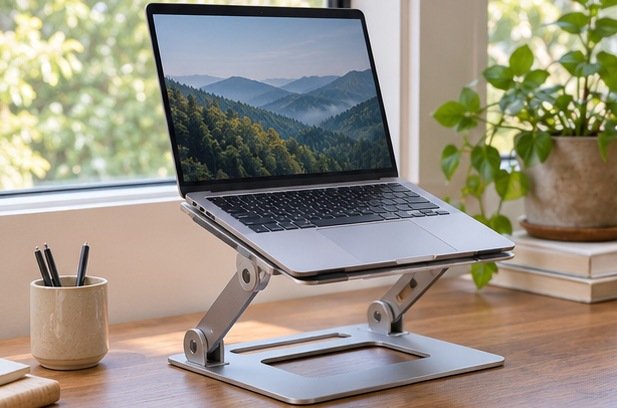
Choose a laptop stand that places the screen where you can read comfortably while leaving room for the keyboard, mouse, and cables you use. A fixed riser makes sense for a desk with one user and a consistent chair height. An adjustable stand helps when people share the desk or the laptop needs to line up beside a separate screen. Start by measuring the position you want and use those dimensions to rule out stands that won't reach it.
Work out the height before you shop
Sit at your usual height and test an approximate laptop position with a stable surface and an external keyboard. Keep a clear line of sight and enough distance to read comfortably. Adjust the screen angle and check for glare from lights and windows. Measure from the desk to the underside of the laptop in that setup. Also measure the area that must remain clear for your hands and mouse. The stand's construction may use some of the area you expected to leave free.
Think about whether you plan to type on the laptop. Raising the screen and keyboard together can leave the keys at an awkward angle for long tasks, so compare a low tilt stand for occasional portable use with a taller riser and separate input devices for longer work. If the desk doubles as a dining table, factor in the effort to install and remove the extra equipment. A small stand with a height you like and one compact keyboard can be easier to set up than a large mount with many positions.
Compare fixed, hinged, and folding designs
Fixed stands give you one height and usually one deck angle. With less hardware to adjust, they can make daily setup simple. The Rain Design mStand listing is one example of a fixed aluminum design. Confirm the actual lift at the point your laptop rests. Some curved or sloped trays support the front and rear at different heights. If you are trying to align a camera or a second monitor, measure where that part will end up instead of assuming the screen rises by the stated height.
Hinged stands let you vary height and tilt. Check whether they rely on friction or on indexed settings. A firm joint can help a laptop stay in place, but it may need two hands to adjust. Folding travel risers tend to pack smaller, and many have two narrow rails rather than a full platform. Verify laptop width and feet placement so it sits on the pads. If you regularly plug or unplug cables, assess how the stand reacts to sideways pressure in the position you expect to use most.
Check base footprint and laptop contact
Measure the base with the stand at your chosen height. A model with steep arm geometry can shift the laptop forward or backward as you adjust it. Make sure the screen can open far enough without hitting a wall or a monitor behind it. Check the maker's supported device dimensions and weight. Look for raised front tabs that are high enough to retain the laptop while staying below the area you touch when opening it or using the trackpad.
Look underneath the laptop and compare vents, speakers, and access points with the contact areas. Follow the computer maker's guidance for airflow. A small open platform can leave more of the underside accessible, but contact points still need to be stable. A dense plate may support the outer feet well if it is wide enough. Check how many pads are replaceable as they wear and whether cables can be connected without lifting the device each time.
Build the setup around work you actually do
For video calls, test camera angle and sound with the screen open at its normal position. Lifting the camera can affect the view behind you, and hinge range may limit where it points. If your primary work happens on a separate monitor, choose whether the laptop will sit alongside it or below it. An offset position may work well for messaging, while a screen used constantly needs to sit where you can see it without repeatedly twisting around other desk items.
Set up power or dock connections before deciding the stand's final position. Leave room for connectors that project beyond the sides and for cable bends without tension. If the laptop leaves the desk frequently, a stand that lets you lift it off after disconnecting a single cable is useful. A vertical storage stand has a different job and can be appropriate if you use a separate screen and the computer maker supports closed operation under your conditions.
Test the desk before fixing anything in place
When the stand arrives, assemble and use it on a level surface according to the instructions. Fit the unloaded stand first and confirm adjustments lock or hold as designed before putting the device on it. Check screen wobble while plugging in a cable or tapping a key. If the desk itself shakes when you type, changing the placement may help more than adding height. Review where the center of the device sits above the base and avoid placing the stand where a bag or elbow can brush the laptop off the edge.
Leave the setup in the trial position for a normal work session, then check whether you moved the chair, screen, keyboard, or mouse. Those changes show where you need more adjustment. If the stand will be shared, write down a height setting each person can return to easily. Keep the space underneath clear if it is needed for ventilation or for reaching an adjustment. The stand's benefit should be visible in your desk arrangement, without introducing more assembly at the beginning and end of every session.
Consider mobility and how the device comes off
If the laptop moves between rooms, test removing it without holding the entire stand down. A tall rear lip or taut cable can make a one-handed lift awkward. Check whether you normally open the laptop from one corner or from the center and whether the tray clears that motion. Leave a place to set the unplugged power lead so it does not slide behind the desk.
For a desk shared with a second person, decide which parts of the setup should move every time. A centered fixed riser can stay put when the external keyboard moves aside. A swingable stand may be convenient where you often turn the screen for another person, provided it has room at both ends of the rotation. Measure the full sweep if a lamp or wall sits close.
Related guide: Read the companion buying guide.
Reference: See the source and specifications.
Frequently asked questions
Do I need an external keyboard with a laptop stand?
A taller riser usually works most comfortably with a separate keyboard. A low tilt may suit shorter sessions while using the laptop keys. Test the position with your own desk and chair.
Is aluminum the most important feature?
Consider stability, suitable dimensions, airflow, and contact pads first. A material label doesn't reveal hinge stiffness or whether the laptop's feet will settle on the supports.
Can one stand fit several laptops?
Check each device's dimensions, weight, and contact points against the manufacturer specifications. Confirm the front tabs, ports, and vents remain usable with every computer you intend to place on it.


